
Nissan Juke Service and Repair Manual : Liquid Gasket
REMOVAL OF LIQUID GASKET SEALING
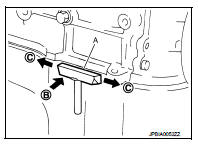
• After removing mounting nuts and bolts, separate the mating surface using the seal cutter [SST: KV10111100] (A) and remove old liquid gasket sealing.
CAUTION:
Be careful not to damage the mating surface
s.
• Tap the seal cutter [SST: KV10111100] to insert it (B), and then slide it (C) by tapping on the side as shown in the figure.
• In areas where the seal cutter [SST: KV10111100] is difficult to use, lightly tap the parts using a plastic hammer to remove it.
CAUTION:
If for some unavoidable reason tool such as a screwdriver is
used, be careful not to damage the mating surfaces.
LIQUID GASKET APPLICATION PROCEDURE
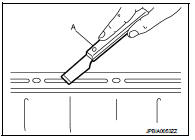
1. Using a scraper (A), remove old liquid gasket adhering to the liquid gasket application surface and the mating surface.
• Remove liquid gasket completely from the groove of the liquid gasket application surface, mounting bolts, and bolt holes.
2. Wipe the liquid gasket application surface and the mating surface with white gasoline (lighting and heating use) to remove adhering moisture, grease and foreign materials.
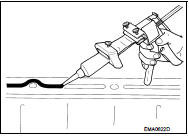
3. Attach liquid gasket tube to the tube presser (commercial service tool).
Use Genuine Liquid gasket or equivalent.
4. Apply liquid gasket without gaps to the specified location according to the specified dimensions.
• If there is a groove for liquid gasket application, apply liquid gasket to the groove.
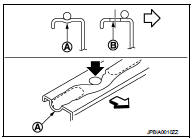
• As for bolt holes (B), normally apply liquid gasket inside the holes. Occasionally, it should be applied outside the holes.
Check to read the text of this manual.
A : Groove
 : Inside
• Within five minutes of liquid gasket application, install the mating component.
• If liquid gasket protrudes, wipe it off immediately.
• Do not retighten mounting bolts or nuts after the installation.
• After 30 minutes or more have passed from the installation, fill engine oil and engine coolant.
CAUTION
:
If there are specific instructions in this manual, observe them.
 Precaution
...

Other materials:
Parking, license plate and tail lamps are not turned on
Without daytime running light system
WITHOUT DAYTIME RUNNING LIGHT SYSTEM : Description
The parking, license plate, tail lamps and each illumination are not turned
ON in any condition.
WITHOUT DAYTIME RUNNING LIGHT SYSTEM : Diagnosis Procedure
1.COMBINATION SWITCH INSPECTION
Check the combina ...
Heater control
Exploded View
1. Intake door cable
2. Air mix door cable
3. Mode door cable
4. Heater control
5. Intake door lever knob
A. To intake door link
B. To air mix door link
C. To mode door link
Removal and Installation
REMOVAL
1. Remove A/C finisher. Refer to IP-13, "Removal and Ins ...
Clutch piping
Exploded View
RS5F92R
1. CSC (Concentric Slave Cylinder)
2. Clutch tube
3. Clutch damper
4. Bracket
5. Master cylinder
RS6F94R
1. CSC (Concentric Slave Cylinder)
2. Clutch tube
3. Clutch damper
4. Bracket
5. Master cylinder
Hydraulic Layout
1. Clutch tube
2. Lock pin
3. ...
