
Nissan Leaf 2018-2025 (ZE1) Owner's Manual : Life with an EV (scene guide)
This section serves as a practical guide to the most essential functions of your Nissan Leaf. To gain a deeper understanding of these capabilities and their operational nuances, please refer to the corresponding chapters in this manual, which provide comprehensive details regarding your vehicle's features.
Charging the Li-ion battery
WARNING
The electric vehicle (EV) system in your Nissan Leaf operates using high-voltage current.
Improper handling or failure to adhere to safety instructions when dealing with the high-voltage system can result in severe physical injury or death. It is imperative that you thoroughly read the "Charging" section of this manual and strictly follow the prescribed procedures and safety guidelines to ensure your well-being and the longevity of your vehicle.
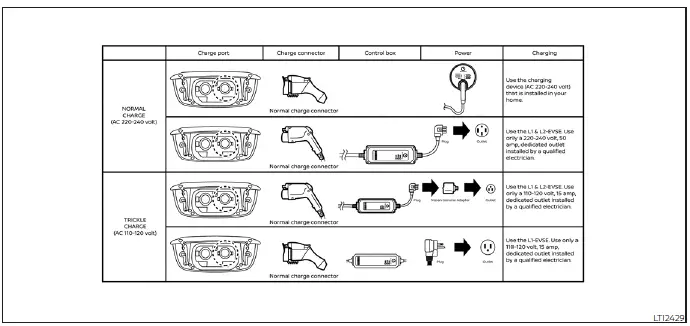
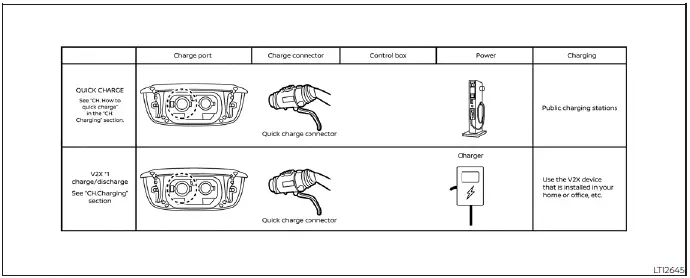
*1: V2X (Vehicle to Everything); The EV supplies electric power to a home or a building, etc. e.g., Vehicle to Home (V2H), Vehicle to Building (V2B), Vehicle to Grid (V2G), Vehicle to Load (V2L), Vehicle to Vehicle (V2V).
Before driving your vehicle (models with Navigation System)
The Nissan Leaf allows you to conveniently monitor the Li-ion battery charging status and the activation state of the battery warmer (if equipped) remotely using an internet-connected smartphone or personal computer from the comfort of your home. You may also configure your vehicle to transmit status updates via SMS directly to your mobile phone. Furthermore, you can proactively manage your cabin environment by operating the heater and air conditioning through the Climate Control Timer or remote climate functions. For specific instructions on setting up these features, refer to the "Remote climate control" section.
NOTE:
- To successfully interface with your Nissan Leaf via a smartphone or PC to check battery status or activate remote climate control, the following infrastructure requirements must be met:
- The vehicle must be positioned within an area with reliable cellular network coverage.
- Your internet-enabled smartphone or mobile device must also be within an area with cellular or data coverage.
- Your personal computer must maintain a stable connection to the internet.
- A functional cellular connection must exist to establish communication between your device and the vehicle.
- Your cellular device must be capable of receiving SMS text messages if you wish to receive automated notifications regarding your charging status.
- The remote climate system provides the capability to adjust the interior cabin temperature prior to your departure.
- When the charging connector is unplugged, the heater and air conditioning systems draw the necessary energy directly from the vehicle's Li-ion battery.
- If you utilize remote climate control while the vehicle is simultaneously charging, be aware that the overall time required to reach a full battery state will increase, as power is diverted to condition the cabin temperature.
Checking Li-ion battery charging status
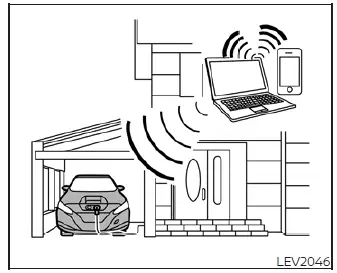
You can monitor the real-time charge status of your Li-ion battery through the NISSAN Data Center website, accessible via any internet-connected smartphone or personal computer.
If you find that the current battery level is insufficient for your planned trip, you have the flexibility to initiate a charging cycle remotely using the remote charge function. For more details on this capability, see "Charging related remote function."
Operating the climate control system before driving
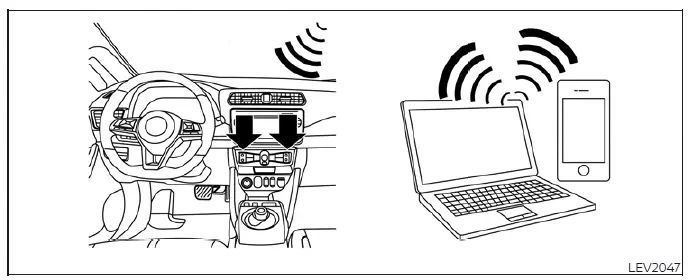
You can effortlessly manage your vehicle's cabin environment by activating the heating and air conditioning system remotely. This feature is accessible through an internet-connected smartphone or personal computer, giving you complete control over your comfort from virtually anywhere.
By pre-conditioning the cabin while the Nissan Leaf is still plugged into a charging source, you can achieve your desired temperature without depleting the main battery pack.
This proactive energy management significantly reduces the initial load on the Li-ion battery once you begin your journey, thereby helping to maximize and extend the overall driving range of your Nissan Leaf.
For more details on setting up this convenience, please consult the "Remote climate control" section.
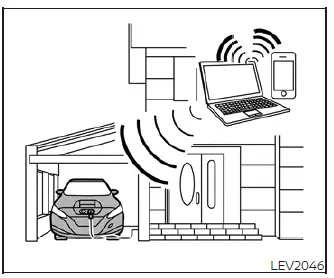
Notification of Li-ion battery warmer operation (if so equipped)
Your Nissan Leaf provides peace of mind by allowing you to monitor the status of the Li-ion battery warmer system through the NISSAN Data Center website, which can be accessed via an internet-enabled smartphone or personal computer.
If the vehicle is parked with the power switch in the OFF position and the charging cable disconnected, the system will send you a notification if the battery warmer engages or stops. This alert serves as a helpful reminder to connect your charger, ensuring the vehicle remains optimized for your next drive.
For additional configuration details, please refer to the NissanConnect Manual.
Starting your vehicle
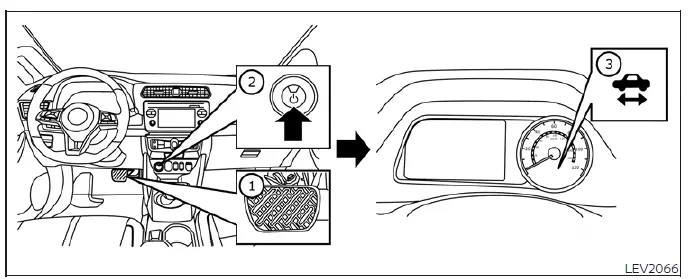
1. Firmly depress the brake pedal.
2. Push the power switch to engage the EV system.
3. Verify that the "READY to drive" indicator light is illuminated on the instrument cluster. For more information, please see the section regarding the "READY to drive" indicator light.
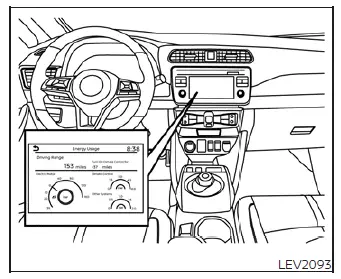
4. For models equipped with a Navigation System: If you require route assistance, enter your destination directly into the navigation interface.
For further navigation guidance, please refer to the NissanConnect Manual.
5. Review the current Li-ion battery charge level and the estimated driving range displayed on the meter to ensure you have sufficient power for your trip. See the "Driving range" section for details.
NOTE:
- Please consult the "Driving range" section for in-depth information on maximizing your efficiency.
- Before setting off, compare the distance to your destination as shown on the navigation screen with the current estimated driving range on the meter. This allows you to determine if a charging stop will be required along your route.
- If charging is necessary, utilize the navigation system to identify available, compatible charging stations along your planned driving path.
Driving the vehicle
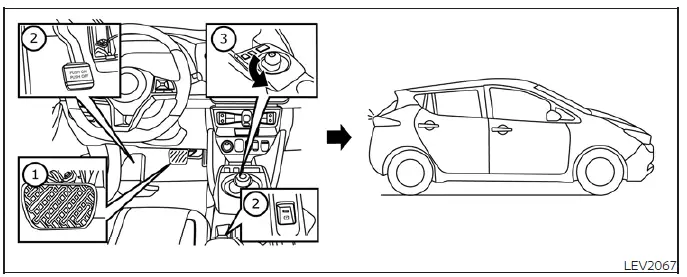
1. Depress the brake pedal.
2. Release the parking brake.
3. Move the shift lever into the D (Drive) position. The shift lever is designed to return to its center position automatically after selection.
4. Confirm the selection by checking that the indicator next to the "D" on the shift console is lit and the letter "D" is visible on the meter display.
5. Release the brake pedal.
6. Gently depress the accelerator pedal to begin your drive in the Nissan Leaf.
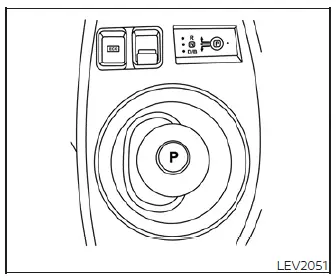
Your vehicle offers specialized gear positions to enhance your driving experience:
- Use the D (Drive) position for standard, efficient, and responsive performance in typical driving conditions.
- Use the B mode when navigating downhill gradients.
The B mode enhances the regenerative braking effect; when you lift your foot from the accelerator, the vehicle will provide more significant deceleration compared to the standard D (Drive) position, helping to maintain speed control without excessive use of the mechanical brakes.
NOTE:
The regenerative braking system functions by converting the vehicle's kinetic energy during forward motion back into electrical power, which effectively helps to decelerate the Nissan Leaf while simultaneously replenishing the battery.
For city driving or situations where you wish to maximize your total vehicle range, we recommend utilizing the ECO mode. This mode actively manages and reduces power consumption by tempering acceleration; the throttle response is more gradual compared to the standard D (Drive) mode, allowing for a more energy-efficient driving experience.
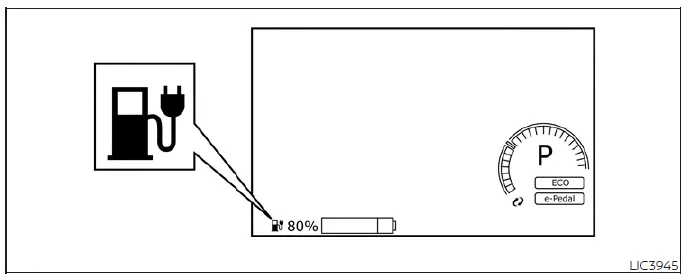
Should the low battery charge indicator
 illuminate in yellow, it serves as a critical alert that the Li-ion battery charge has dropped to a level insufficient for extended travel. For detailed information regarding your remaining energy, please refer to the "Li-ion battery available charge gauge" section. It is essential that you locate a charging station and charge the battery as soon as possible.
Parking the vehicle
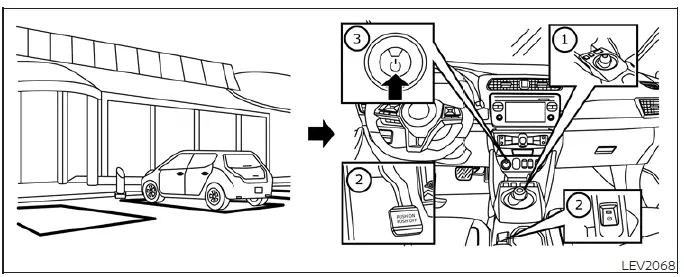
1. When bringing your Nissan Leaf to a complete stop, keep the foot brake firmly depressed, then push the P (Park) position switch located on the shift lever. Always verify that the vehicle is securely in the P (Park) position by observing the shift indicator near the lever or on the primary vehicle information display.
2. Engage the parking brake. For models equipped with a pedal-style parking brake, depress the pedal firmly. For models featuring the electronic parking brake system, the brake is often applied automatically; however, you may also engage it manually by pulling the electronic parking brake switch upward.
3. Push the power switch to transition the vehicle to the OFF position.
4. If your parking location offers public or private charging facilities, we encourage you to charge the Li-ion battery as necessary to ensure your vehicle is ready for your next departure.
Charging after driving
Charging the Li-ion battery
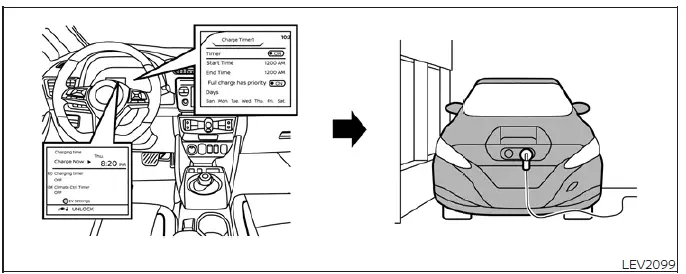
Upon returning home, connect your Nissan Leaf to your home charging station or use the standard EVSE (Electric Vehicle Supply Equipment) cable connected to a wall outlet using the appropriate charge connector.
You may choose to begin charging immediately or utilize the integrated charging timer function to schedule your vehicle to charge during specific off-peak hours. For further details on configuration, please see the "Charging timer" section.
1. When the power switch is in the OFF position, the vehicle information display will conveniently show the current settings for the charging timer, the Climate Control Timer, the charge connector lock status, and your current estimated driving range. Please refer to the "Timer display" section for more details.
2. Open the exterior charge port lid and remove the internal charge port cap to reveal the connection point.
3. Firmly insert the charge connector into the vehicle's charge port until it clicks into place.
4. If the charging timer is active, the vehicle will wait to begin the cycle until the designated time is reached. If no timer is set, the charging process will commence immediately.
NOTE:
- You have the flexibility to override a scheduled charging timer and start the charging process remotely if needed.
- If you inadvertently forget to connect the charging cable upon arriving home, the Nissan Leaf includes a notification feature that can send an alert to your smartphone, text-capable mobile phone, or notify you via the internet.
- To ensure the highest level of convenience, NISSAN recommends connecting the normal charge cable every time you exit the vehicle, even if you do not plan to charge immediately. By keeping it connected, you ensure the vehicle can draw power directly from the grid for remote climate control or timer functions, thereby preserving the Li-ion battery's state of charge for your next drive.
 EV characteristics
WARNING
Always exercise heightened vigilance regarding pedestrians in your vicinity.
Because the electric drivetrain of the Nissan Leaf operates without the audible signatu ...

Other materials:
Lift gate
WARNING
• Always be sure the lift gate has been closed securely to prevent it from
opening while driving.
• Do not drive with the lift gate open.
This could allow dangerous exhaust gases to be drawn into the vehicle.
See “Exhaust gas (carbon monoxide)� of this manual.
• Do not ...
Towing recommended by NISSAN
Two-Wheel Drive (2WD) models
NISSAN recommends that your vehicle be towed with the driving (front) wheels
off the ground or place the vehicle on a flat bed truck as illustrated.
CAUTION
• Never tow CVT models with the front wheels on the ground or four wheels
on the ground (forward ...
B20A0 cranking request circuit
DTC Logic
DTC DETECTION LOGIC
NOTE:
If DTC B20A0 is displayed with DTC U1000, first perform the trouble diagnosis
for DTC U1000. Refer to PCS-
30, "DTC Logic".
DTC CONFIRMATION PROCEDURE
1.PERFORM DTC CONFIRMATION PROCEDURE
1. Perform DTC CONFIRMATION PROCEDURE for DTC P1650. Re ...
