
Nissan Juke Owners Manual : Instrument panel
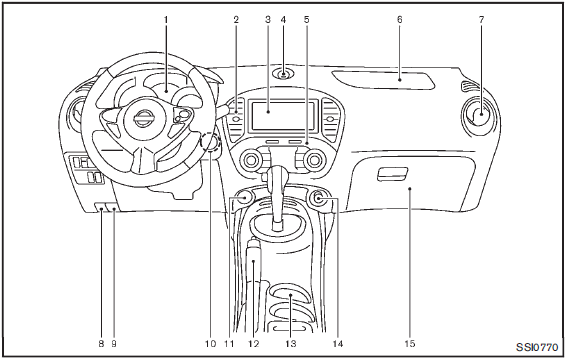
1. Meters and gauges
2. Center ventilator
3. Audio system or Navigation system
— Clock
4. Hazard warning flasher switch
5. Integrated Control System
— Drive mode
— Heater and air conditioner control
— Defroster switch
5. Heater and air conditioner control (models without Integrated Control System)
— Defroster switch
6. Front passenger supplemental air bag
7. Side ventilator
8. Fuel-filler door release handle
9. Hood release handle
10. Push-button ignition switch (models with Intelligent Key system)
11. AUX/USB connector
12. Parking brake
13. Cup holder
14. Power outlet
15. Glove box
: if so equipped
: Refer to the separate Navigation System Owner’s Manual.
 Cockpit
1. Outside mirror remote control switch
2. Headlight, fog light and turn signal switch
— Headlight
— Turn signal light
— Fog light
3. Steering wheel
— Electric power steering system
â ...
 Meters and gauges
1. Tachometer
2. Engine coolant temperature gauge
3. Vehicle information display
— Odometer/twin trip odometer
— Trip computer
— Torque vectoring AWD (AWD model)
— Outside air temperat ...
Other materials:
Hazard and buzzer reminder does not operate
Diagnosis Procedure
1.CHECK DTC WITH BCM AND COMBINATION METER
Check that DTC is not detected with BCM and combination meter.
Is the inspection result normal?
YES >> GO TO 2.
NO-1 >> Refer to BCS-67, "DTC Index". (BCM)
NO-2 >> Refer to MWI-36, "DTC Index&qu ...
Precaution
Precaution for Supplemental Restraint System (SRS) "AIR BAG" and "SEAT
BELT
PRE-TENSIONER"
The Supplemental Restraint System such as “AIR BAG� and “SEAT BELT PRE-TENSIONER�,
used along
with a front seat belt, helps to reduce the risk or severity of injury to the
...
Off position warning does not operate
Diagnosis Procedure
1.CHECK DTC WITH BCM AND COMBINATION METER
Check that DTC is not detected with BCM and combination meter.
Is the inspection result normal?
YES >> GO TO 2.
NO-1 >> Refer to BCS-67, "DTC Index". (BCM)
NO-2 >> Refer to MWI-36, "DTC Index&qu ...
