
Nissan Juke Service and Repair Manual : Front door finisher
Exploded View
LHD models
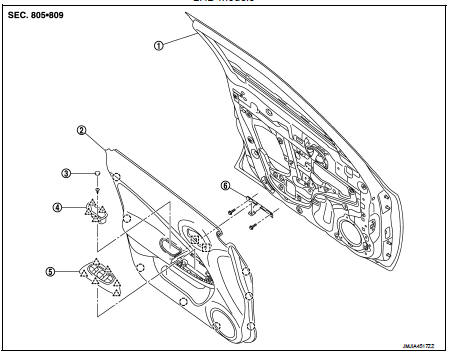
1. Front door panel
2. Front door finisher
3. Cap
4. Pull handle
5. Power window switch finisher
6. Pull handle bracket
 : Clip
 : Pawl
 : Metal clip
Removal and Installation
REMOVAL
CAUTION:
• When removing, always use a remover tool that is made of plastic.
• Never damage the door panel.
1. Fully open door window.
2. Remove pull handle.
1. Remove cap from the pull handle.
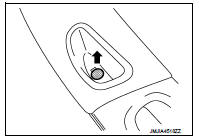
2. Remove pull handle fixing screw.
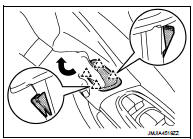
3. Lift up the pull handle while rotating it in direction indicated by the arrow as shown in the figure. Disengage pawls and remove the pull handle.
 : Pawl
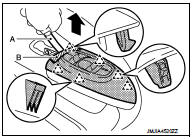
3. Remove power window switch finisher and power window switch as a unit.
1. Disengage power window switch finisher fixing pawls with a remover tool (A).
 Pawl
Pawl
CAUTION:
Apply protective tape (B) on the part to protect it from
damage.
2. Pull up power window switch finisher and power window switch as a unit and disconnect harness connector.
4. Remove front door corner cover. Refer to MIR-43, "DOOR MIRROR ASSEMBLY : Removal and Installation".
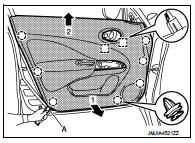
5. Remove front door finisher.
1. Disengage front door finisher fixing clips and metal clips with a remover tool (A).
 : Clip
 : Metal clip
CAUTION:
Insert a remover tool between body side panel and clip
and disengage pawl.
2. Pull toward the direction of the arrows as shown in the figure to remove.
NOTE
:
Remove power window switch. Refer to PWC-44, "Removal and Installation".
INSTALLATION
Note the following item, and install in the reverse order of removal.
CAUTION:
When installing front door finisher, check that clips, and metal clips are
securely in body panel holes,
and press them in.

 Rear door finisher
Exploded View
1. Rear door panel
2. Grommet
3. Rear door corner cover inner
4. Cap
5. Power window switch finisher
6. Rear door finisher
: Clip
: Pawl
: Metal clip
Removal and Installa ...
Other materials:
Fuel tank
Exploded View
1. Fuel filler cap
2. Grommet
3. Fuel filler tube
4. Vent hose
5. Clamp
6. Fuel filler hose
7. Clamp
8. Fuel tank
9. Fuel tank mounting band (RH)
10. Fuel tank mounting band (LH)
11. EVAP canister
12. EVAP canister hose
A. To fuel tube
: Vehicle front
: N·m (k ...
Precaution for Supplemental Restraint System (SRS) "AIR BAG" and "SEAT BELT
PRE-TENSIONER"
The Supplemental Restraint System such as “AIR BAG� and “SEAT BELT PRE-TENSIONER�,
used along
with a front seat belt, helps to reduce the risk or severity of injury to the
driver and front passenger for certain
types of collision. Information necessary to service the system safely is
...
Back door opener switch
Component Function Check
1.CHECK FUNCTION
1. Select “TRUNK� of “BCM� using CONSULT-III.
2. Select “TRNK OPNR SW� in “DATA MONITOR� mode.
3. Check that the function operates normally according to the following
conditions.
Is the inspection result normal?
YES >> Back do ...
