
Nissan Juke Owners Manual : Engine compartment
CAUTION
Never use a fuse of a higher or lower amperage rating than that specified on the fuse box cover. This could damage the electrical system or cause a fire.
If any electrical equipment does not operate, check for an open fuse.
1. Be sure the ignition switch and the headlight switch are turned off.
2. Open the engine hood.
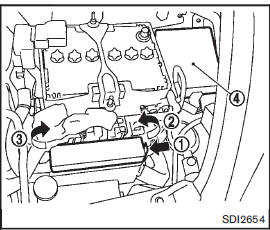
3. Remove the fuse/fusible link holder cover by pushing the tab 1 and lifting the cover from the right side 2 , then the left side 3 .
4. Locate the fuse that needs to be replaced.
5. Remove the fuse using the fuse puller located in the passenger compartment fuse box.
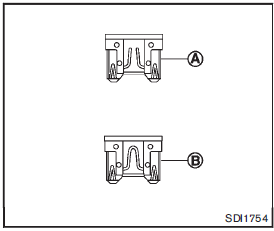
6. If the fuse is openA , replace it with a new fuseB .
7. If a new fuse also opens, have the electrical system checked and repaired by a NISSAN dealer.
The holder4 also contains the fuses. For checking and/or replacing, see a NISSAN dealer.
Fusible links
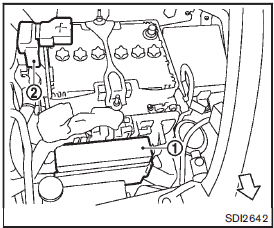
If any electrical equipment does not operate and the fuses are in good condition, check the fusible links in the holders1 and2 . If any of these fusible links are melted, replace only with genuine NISSAN parts.
For checking and replacing the fusible links in the holders2 , see a NISSAN dealer.
 Fuses
Fuses
...
 Passenger compartment
CAUTION
Never use a fuse of a higher or lower amperage rating than that specified
on the fuse box cover. This could damage the electrical system or cause a fire.
If any electrical equipment does ...
Other materials:
Draining
1. Start engine and let it run to warm up transaxle.
2. Stop engine. Remove drain plug (1) and gasket, using a socket
[Commercial service tool] and then drain gear oil.
3. Set a gasket on drain plug and install it to clutch housing, using
a socket [Commercial service tool].
CAUTION:
Never re ...
MOD system operation
The specialized MOD system will automatically turn on and begin scanning your surroundings under the following precise operational conditions:
When the electronic shift selector lever is actively placed in the R (Reverse) position.
When the overall vehicle speed decreases bel ...
Push-button ignition switch position indicator does not illuminate
Description
• Before performing the diagnosis in the following table, check “Work Flow�.
Refer to PCS-88, "Work Flow".
• Check that vehicle is under the condition shown in “Conditions of vehicle�
before starting diagnosis, and
check each symptom.
Conditions of Vehicle ...
