
Nissan Juke Service and Repair Manual : DTC/Circuit diagnosis
POSITION SWITCH
BACK-UP LAMP SWITCH : Component Inspection
1.CHECK BACK-UP LAMP SWITCH
1. Disconnect position switch connector. Refer to TM-24, "Removal and Installation".
2. Check continuity between position switch terminals.

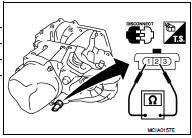
Is the inspection result normal? YES >> INSPECTION END
NO >> Replace position switch. Refer to TM-24, "Removal and Installation".
PARK/NEUTRAL POSITION (PNP) SWITCH : Component Inspection
1.CHECK PARK/NEUTRAL POSITION (PNP) SWITCH
1. Disconnect position switch connector. Refer to TM-24, "Removal and Installation".
2. Check continuity between position switch terminals.

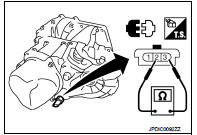
Is the inspection result normal? YES >> INSPECTION END
NO >> Replace position switch. Refer to TM-24, "Removal and Installation".
 Structure and operation
Sectional View
1. 5th input gear
2. 5th-reverse synchronizer hub assembly
3. Input shaft
4. Mainshaft
5. 5th main gear
6. Mainshaft rear bearing
7. 4th main gear
8. 3rd-4th synchronizer ...
 Symptom diagnosis
NOISE, VIBRATION AND HARSHNESS (NVH) TROUBLESHOOTING
NVH Troubleshooting Chart
Use the chart below to find the cause of the symptom. The numbers indicate
the order of the inspection. If necessary, ...
Other materials:
P1778 step motor
Description
• The step motor's 4 aspects of ON/OFF change according to the signal from
TCM. As a result, the flow of line
pressure to primary pulley is changed and pulley ratio is controlled.
• This diagnosis item is detected when electrical system is OK, but mechanical
system is NG.
• ...
Charge port cap
When opening the internal charge port cap to connect a power supply, press the integrated release tab inward firmly and the spring-loaded protective cap will pop open automatically to grant access to the receptacle.
When you are finished servicing the vehicle, pr ...
Combination switch input circuit
Diagnosis Procedure
1.CHECK INPUT 1 - 5 CIRCUIT FOR OPEN
1. Turn ignition switch OFF.
2. Disconnect BCM and combination switch connectors.
3. Check continuity between BCM harness connector and combination switch harness
connector.
Does continuity exist?
YES >> GO TO 2.
NO >> ...
