
Nissan Juke Service and Repair Manual : Diagnosis system (BCM) (with intelligent key system)
Common item
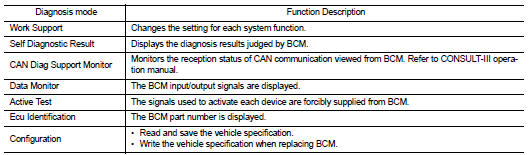
COMMON ITEM : CONSULT-III Function (BCM - COMMON ITEM)
APPLICATION ITEM
CONSULT-III performs the following functions via CAN communication with BCM.
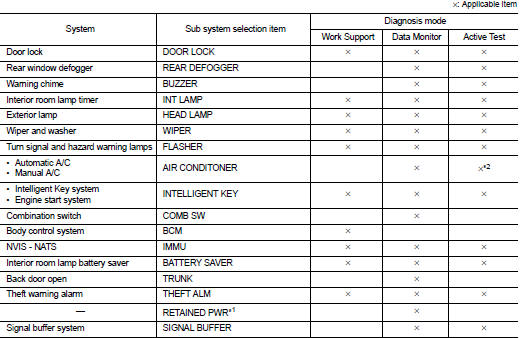
SYSTEM APPLICATION
BCM can perform the following functions for each system.
NOTE
:
It can perform the diagnosis modes except the following for all sub system
selection items.
NOTE
:
• *1: This item is displayed, but not used.
• *2: For models with automatic A/C, this diagnosis mode is not used.
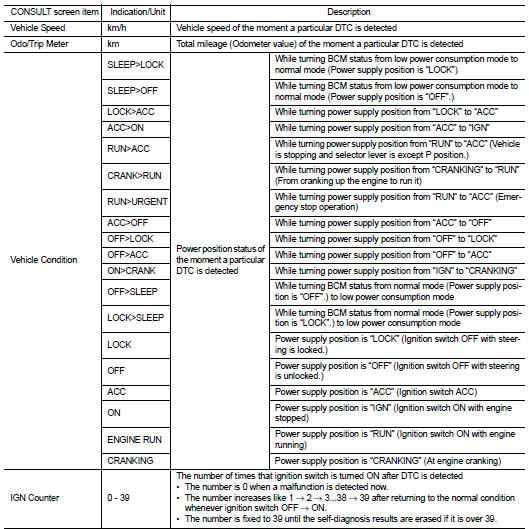
FREEZE FRAME DATA (FFD)
The BCM records the following vehicle condition at the time a particular DTC is detected, and displays on CONSULT-III.
Headlamp
HEADLAMP : CONSULT-III Function (BCM - HEAD LAMP)
WORK SUPPORT
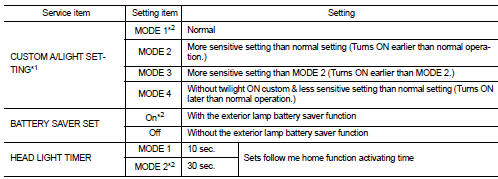
*1: For models is without auto light system, this item is displayed but work support is not operated.
*2: Factory setting
DATA MONITOR
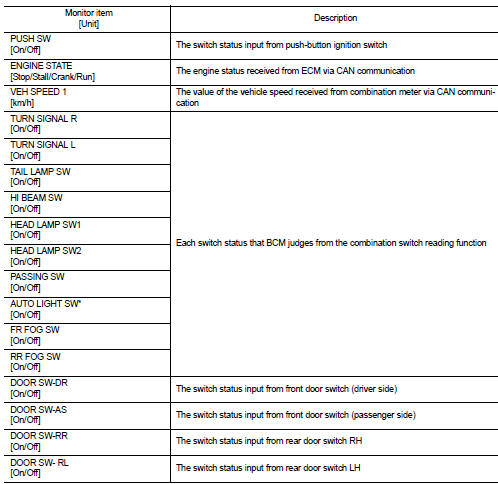
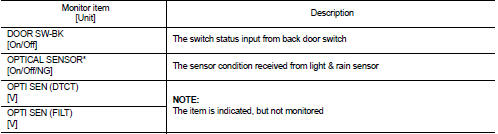
*: For models without auto light system, this is not displayed.
ACTIVE TEST
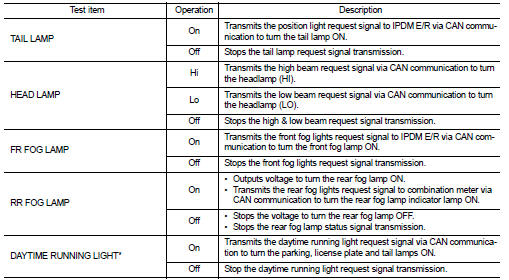
*: For models without daytime running light system, this item is not displayed.
Flasher
FLASHER : CONSULT-III Function (BCM - FLASHER)
WORK SUPPORT

*: Factory setting DATA MONITOR
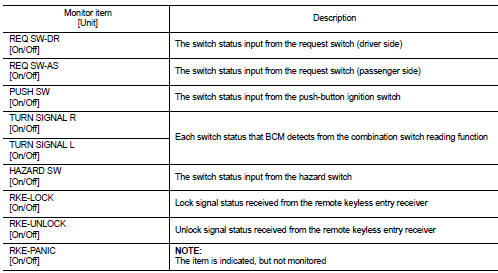
ACTIVE TEST

 System
Headlamp system
HEADLAMP SYSTEM : System Diagram
HEADLAMP SYSTEM : System Description
OUTLINE
Headlamp is controlled by combination switch reading function and headlamp
control function of BCM ...
 Diagnosis system (BCM) (without intelligent key system)
Common item
COMMON ITEM : CONSULT-III Function (BCM - COMMON ITEM)
APPLICATION ITEM
CONSULT-III performs the following functions via CAN communication with BCM.
SYSTEM APPLICATION
BCM can perfo ...
Other materials:
Compressor
Exploded View
REMOVAL
1. High-pressure flexible hose
2. O-ring
3. Compressor
4. O-ring
5. Low-pressure flexible hose
A. To condenser
B. To evaporator
: N·m (kg-m, ft-lb)
DISASSEMBLY
1. Compressor unit
2. Field coil
3. Snap ring
4. Pulley assembly
5. Snap ring
6. Shim
7. ...
P0130 A/F sensor 1
DTC Logic
DTC DETECTION LOGIC
To judge malfunctions, the diagnosis checks that the A/F signal computed by
ECM from the A/F sensor 1 signal
fluctuates according to fuel feedback control.
DTC CONFIRMATION PROCEDURE
1.PRECONDITIONING
If DTC Confirmation Procedure has been previously conducted ...
Component parts
Component Parts Location
LHD models
1. Multi display unit*
Refer to DMS-3, "Component Parts
Location".
2. ABS actuator and electric unit (control
unit)
Refer to BRC-9, "Component Parts
Location" (without ESP), BRC-97,
"Component Parts Location" (with
ESP).
...
