
Nissan Juke Service and Repair Manual : Diagnosis and repair work flow
Work Flow
OVERALL SEQUENCE
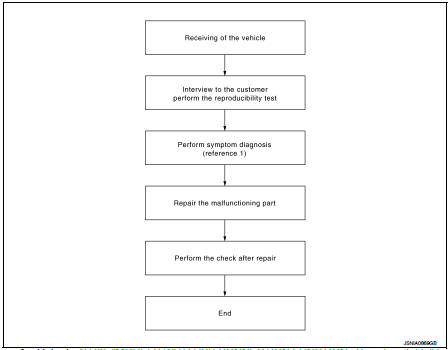
Reference 1··· Refer to AV-33, "MODELS WITH USB CONNECTION FUNCTION : Symptom Table" (with USB connection function) or AV-35, "MODELS WITHOUT USB CONNECTION FUNCTION : Symptom Table" (without USB connection function).
DETAILED FLOW
1.CHECK SYMPTOM
Check the malfunction symptoms by performing the following items.
• Interview the customer to obtain the malfunction information (conditions and environment when the malfunction occurred).
• Check the symptom.
>> GO TO 2.
2.PERFORM DIAGNOSIS BY SYMPTOM
Perform the relevant diagnosis referring to the diagnosis chart by symptom. Refer to AV-33, "MODELS WITH USB CONNECTION FUNCTION : Symptom Table" (with USB connection function) or AV-35, "MODELS WITHOUT USB CONNECTION FUNCTION : Symptom Table" (without USB connection function).
>> GO TO 3.
3.REPAIR OR REPLACE MALFUNCTIONING PARTS
Repair or replace the malfunctioning parts.
>> GO TO 4.
4.FINAL CHECK
Perform the operation to check that the malfunction symptom is solved or any other symptoms are present.
Is there any symptom? YES >> GO TO 2.
NO >> INSPECTION END
 Basic inspection
...
 Additional service when removing battery negative terminal
Description
• The audio unit is equipped with the anti-theft system.
• The audio unit operates after authenticating a fixed four-digit anti-theft
code.
• After removing the battery of the a ...
Other materials:
Component parts
Automatic air conditioning system : Component Parts Location
1. BCM
• With Intelligent Key: Refer to BCS-
6, "BODY CONTROL SYSTEM :
Component Parts Location".
• Without Intelligent Key: Refer to
BCS-96, "BODY CONTROL SYSTEM
: Component Parts Location".
2. Magnet clu ...
Rear Cross Traffic Alert (RCTA)
WARNING
Failure to strictly adhere to the safety warnings and operational instructions regarding the Rear Cross Traffic Alert (RCTA) system can lead to severe vehicle damage, serious personal injury, or even fatalities.
The RCTA system is a convenience feature and is not a substi ...
Water pump
Exploded View
1. Water pump
2. Gasket
3. Cylinder block
Removal and Installation
WARNING:
Never remove the radiator cap when the engine is hot. Serious burns could occur
from high pressure
coolant escaping from the radiator.
REMOVAL
1. Drain engine coolant. Refer to CO-62, "Drain ...
