
Nissan Juke Owners Manual : Checking engine oil level
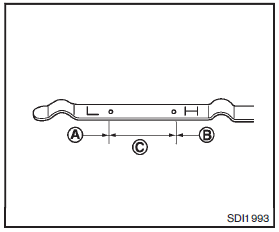
1. Park the vehicle on a level surface and apply the parking brake.
2. Run the engine until it reaches operating temperature.
3. Turn off the engine. Wait more than 10 minutes for the oil to drain back into the oil pan.
4. Remove the dipstick and wipe it clean.
Reinsert it all the way.
5. Remove the dipstick again and check the oil level. It should be within the rangeC . If the oil level is below A , remove the oil filler cap and pour recommended oil through the opening. Do not overfillB .
6. Recheck oil level with the dipstick.
It is normal to add some oil between oil maintenance intervals or during the breakin period, depending on the severity of operating conditions.
CAUTION
Oil level should be checked regularly.
Operating the engine with an insufficient amount of oil can damage the engine, and such damage is not covered by the warranty.
 Engine oil
...
 Changing engine oil and filter
Change the engine oil and filter according to the maintenance log shown in the
NISSAN Service and Maintenance Guide.
Vehicle set-up
1. Park the vehicle on a level surface and apply the parking bra ...
Other materials:
System (power door lock system)
System Diagram
System Description
DOOR LOCK FUNCTION
Door Lock and Unlock Switch
• The door lock and unlock switch (driver side) is build into power window main
switch.
• The door lock and unlock switch (passenger side) is build into front power
window switch (passenger side).
• In ...
Precaution Necessary for Steering Wheel Rotation after Battery Disconnect
NOTE:
• Before removing and installing any control units, first turn the ignition
switch to the LOCK position, then disconnect
both battery cables.
• After finishing work, confirm that all control unit connectors are connected
properly, then re-connect both
battery cables.
• Always us ...
Clutch pedal position switch
Component Function Check
1.CHECK CLUTCH PEDAL POSITION SWITCH FUNCTION
With CONSULT-III
1. Turn ignition switch ON.
2. Select “ENGINE� using CONSULT-III.
3. Select “CLUTCH P/P SW� in “DATA MONITOR� mode.
4. Check “CLUTCH P/P SW� indication under the following conditions.
Wit ...
