
Nissan Juke Service and Repair Manual : Camshaft valve clearance
Valve Clearance
CHECKING AND ADJUSTING THE VALVE CLEARANCE
1. Install the tappet.
2. Install the camshaft.
3. Install the camshaft brackets.
 : 11 N·m (1.1 kg-m, 8 ft-lb)
4. Place the valves of the cylinder concerned at the “end of exhaust - beginning of inlet� position and check the clearance (X).
NOTE
:
Dimension (Y) corresponds to the tappet thickness sizes (there
are 25 sizes at the service parts).

5. Compare the values recorded with the values specified, then replace the tappets which are not within tolerance.
Clearance, when the engine cold: Intake : 0.125 - 0.25 mm (0.0049 - 0.0098 in) Exhaust : 0.325 - 0.45 mm (0.0128 - 0.0177 in)
6. Remove the camshaft brackets.
7. Remove the camshaft.
8. Remove the tappet not within tolerance.
Determining dimension Y.
Set up the following assembly using KV113B0050 (Mot. 252-01) (Commercial service tool) or equivalent tool and dial gauge, then calibrate the gauge.
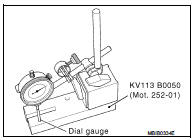
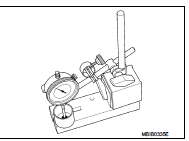
9. Raise the gauge extension (without modifying the position of the magnetic support/gauge assembly), then slide in the tappet to be measured.
• Note dimension (Y) and repeat the operation for the tappets where the valve clearance is not within tolerance.
• Refer to the Replacement Parts Catalogue for the vehicle concerned to select the various thicknesses of the tappet(s).
10. Check the valve clearance again.
11. Remove the camshaft brackets.
12. Remove the camshaft.
13. Remove the tappet(s) not within tolerance.
14. Grease the underside of the tappets and the camshaft brackets.
15. Degrease the gasket faces (of the cylinder head and brackets 1 and 6). They should be clean, dry and free from grease (in particular, remove finger marks).
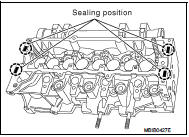
16. Lay four beads of Loctite with a width of 1 mm (0.04 in) on brackets 1 and 6 of the cylinder head.
17. Install the camshaft.
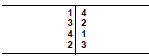
18. Install the camshaft brackets (these are numbered from 1 to 6 and bearing (1) should be positioned on the flywheel end).
: 11 N·m (1.1 kg-m, 8 ft-lb)
 Basic inspection
...
 Symptom diagnosis
Noise, vibration and harshnesS (NVH) Troubleshooting
NVH Troubleshooting - Engine Noise
Use the Chart Below to Help You Find the Cause
of the Symptom
1. Locate the area where noise occurs.
2. C ...
Other materials:
Setup function
While in the Drive mode, the following items can be set up by pressing the SETUP
button.
• Display Brightness
• Button Brightness
• Clock Time Setting
• Select Language
• Select Units
• Auto Interior Illumination
• Selective Door unlock
• Auto Headli ...
System initialization
Description
If any of the following operations are performed, the initialization is
necessary for normal operation of power
window system.
• Disconnection and connection of battery cable from negative terminal.
• When power window main switch replaced.
• Electric power supply to power ...
U1119 lost comm (multi-display)
Description
CAN (Controller Area Network) is a serial communication line for real-time
application. It is an on-vehicle multiplex
communication line with high data communication speed and excellent malfunction
detection ability.
Many electronic control units are equipped onto a vehicle, and ...
