
Nissan Juke Service and Repair Manual : Brake pedal
Exploded View
WITHOUT ESP
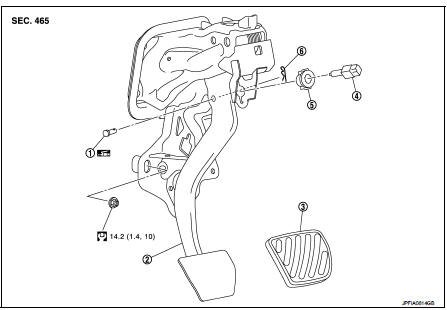
1. Clevis pin
2. Brake pedal assembly
3. Brake pedal pad
4. Stop lamp switch
5. Clip
6. Snap pin
 : Apply multi-purpose grease.
 : N·m (kg-m, ft-lb)
WITH ESP
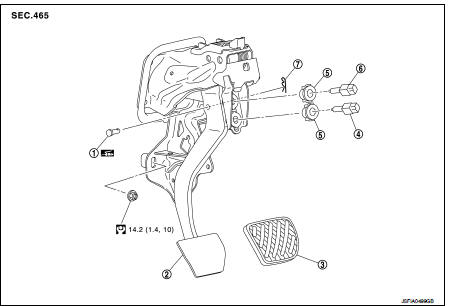
1. Clevis pin
2. Brake pedal assembly
3. Brake pedal pad
4. Brake switch/brake pedal position
switch
5. Clip
6. Stop lamp switch
7. Snap pin
: Apply multi-purpose grease.
: N·m (kg-m, ft-l
Removal and Installation
REMOVAL
1. Remove instrument lower panel. Refer to IP-13, "Removal and Installation".
2. Disconnect the stop lamp switch and the brake switch/brake pedal position switch harness connectors.
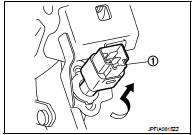
3. Rotate the stop lamp switch and the brake switch/brake pedal position switch (1) counter clockwise to remove.
4. Disconnect the accelerator pedal harness connector and harness clip.
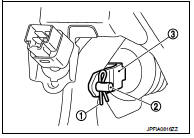
5. Remove snap pin (1) and clevis pin (2) from clevis (3) of brake booster.
6. Remove the brake pedal assembly.
CAUTION:
Hold the brake booster and master cylinder assembly so as
not to drop out or contact them other parts.
7. Remove accelerator pedal from brake pedal assembly. Refer to ACC-3, "Removal and Installation".
8. Perform inspection after removal. Refer to BR-90, "Inspection and Adjustment".
INSTALLATION
Note the following, and install in the reverse order of removal.
• Apply the multi-purpose grease to the clevis pin and the mating faces. (Not necessary if grease has been already applied) NOTE
:
The clevis pin may be inserted in either direction.
• Perform adjustment after installation. Refer to BR-90, "Inspection and Adjustment".
Inspection and Adjustment
INSPECTION AFTER REMOVAL
• Check for the following items and replace the brake pedal assembly if necessary.
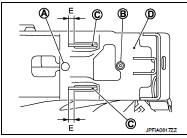
- Check the brake pedal upper rivet (made by aluminum) (A) and pin (B) for deformation.
- Check the brake pedal for bend, damage, and cracks on the welded parts.
- Check the lapping length (E) of sub-bracket (C) and slide plate (D).
E : 5.5 mm (0.217 in) or more
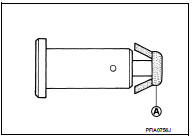
• Check clevis pin and plastic stopper (A) for damage and deformation.
If any is found, replace clevis pin.
ADJUSTMENT AFTER INSTALLATION
• Adjust each item of brake pedal after installing the brake pedal assembly to the vehicle. Refer to BR-77, "Inspection and Adjustment".
• Perform the release position learning of the accelerator pedal.
- HR16DE: Refer to EC-542, "Work Procedure".
- MR16DDT: Refer to EC-134, "Work Procedure".

 Brake piping
Front : Exploded View
WITHOUT ESP
1. Brake booster
2. Master cylinder assembly
3. Brake tube
4. Connector bracket
5. Connector
6. ABS actuator and electric unit (control
unit)
7. Lock p ...
Other materials:
B26F0 steering lock relay
DTC Logic
DTC DETECTION LOGIC
NOTE:
• If DTC B26F0 is displayed with DTC U1000, first perform the trouble diagnosis
for DTC U1000. Refer to
BCS-83, "DTC Logic".
• If DTC B26F0 is displayed with DTC U1010, first perform the trouble diagnosis
for DTC U1010. Refer to
BCS-84, &qu ...
Basic inspection
DIAGNOSIS AND REPAIR WORK FLOW
Work Flow
DETAILED FLOW
1.OBTAIN INFORMATION ABOUT SYMPTOM
Interview the customer to obtain as much malfunction information (conditions
and environment when the malfunction
occurred) as possible when the customer brings the vehicle in.
>> GO TO 2.
2. ...
C1115 wheel sensor
DTC Logic
DTC CONFIRMATION PROCEDURE
1.PRECONDITIONING
If “DTC CONFIRMATION PROCEDURE� has been previously conducted, always turn
ignition switch OFF and
wait at least 10 seconds before conducting the next test.
>> GO TO 2.
2.CHECK DTC DETECTION
With CONSULT-III.
1. Stat th ...
