
Nissan Juke Owners Manual : Antenna
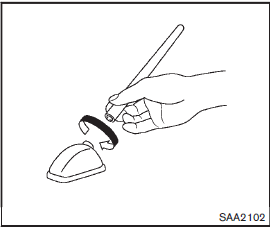
To remove the antenna, hold the bottom of the antenna and turn it counterclockwise.
To install the antenna, turn the antenna clockwise and tighten.
CAUTION
• To avoid damaging or deforming the antenna, be sure to fold down (if so equipped) or remove the antenna under the following conditions.
— The vehicle enters a garage with a low ceiling.
— The vehicle is covered with a car cover.
• Be sure that antenna is removed before the vehicle enters an automatic car wash.
• Always properly tighten the antenna rod during installation. Otherwise, the antenna rod may break during vehicle operation.
 Steering wheel switch for audio control
1. SOURCE select switch
2. Tuning switch
3. VOLUME control switch
The audio system can be operated using the controls on the steering wheel.
SOURCE select switch
Push the SOURCE select switch t ...
 Car phone or CB radio
When installing a car phone or a CB radio in your vehicle, be sure to observe
the following precautions, otherwise the new equipment may adversely affect the
electronic control modules and electro ...
Other materials:
Water outlet
Exploded View
1. Engine coolant temperature sensor
2. O-ring
3. Lock plate
4. Gasket
5. Water outlet and thermostat assembly
6. Air relief plug
7. Clamp
8. Water hose
9. Water pipe
A. To radiator hose upper
B. To EGR cooler hose
C. To heater hose
: N·m (kg-m, ft-lb)
: Always ...
Component parts
Component Parts Location
LHD
1. ABS actuator and electric unit (control
unit)
2. Front wheel sensor
3. Stop lamp switch
4. Rear wheel sensor
A. Inside engine room
B. Steering knuckle
C. Brake pedal
D. ABS warning lamp, brake warning
lamp (in combination meter)
E. Rear wheel hub and ...
Steering wheel turning force is heavy or light
Description
Steering wheel turning force is heavy or light.
Diagnosis Procedure
1.CHECK THE ILLUMINATION OF THE EPS WARNING LAMP
Check that the EPS warning lamp turns ON when ignition switch turns ON. Then,
EPS warning lamp turns
OFF after the engine is started.
Is the inspection result no ...
