
Nissan Juke Owners Manual : Adjust
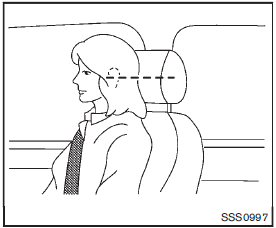
For adjustable head restraint/headrest
Adjust the head restraint/headrest so the center is level with the center of your ears. If your ear position is still higher than the recommended alignment, place the head restraint/headrest at the highest position.
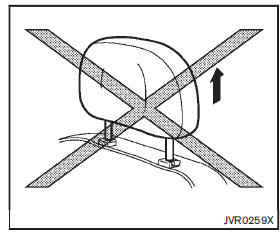
For non-adjustable head restraint/headrest
Make sure the head restraint/headrest is positioned so the lock knob is engaged in the notch before riding in that designated seating position.
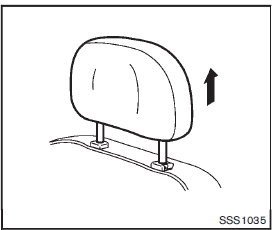
Raise
To raise the head restraint/headrest, pull it up.
Make sure the head restraint/headrest is positioned so the lock knob is engaged in the notch before riding in that designated seating position
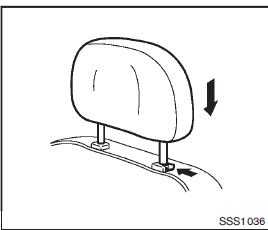
Lower
To lower, push and hold the lock knob and push the head restraint/headrest down.
Make sure the head restraint/headrest is positioned so the lock knob is engaged in the notch before riding in that designated seating position.
 Install
1. Align the head restraint/headrest stalks with the holes in the seat. Make
sure that the head restraint/headrest is facing the correct direction. The stalk
with the adjustment notch1 must be i ...
 Front-seat Active Head Restraints
The Active Head Restraint moves forward utilizing the force that the seatback
receives from the occupant in a rear-end collision. The movement of the head restraint
helps support the occupant’ ...
Other materials:
System temporarily unavailable
In certain operational scenarios, the Intelligent Blind Spot Intervention (I-BSI) system in your Nissan Leaf may automatically deactivate to ensure safety. In these instances, you will hear an audible chime, and a specific warning message will appear on the vehicle information display, signaling tha ...
Larger children
Children should remain in a forward-facing child restraint with a harness until
they reach the maximum height or weight limit allowed by the child restraint manufacturer.
Once a child outgrows the height or weight limit of the harness-equipped forward-facing
child restraint, NISSAN recommends t ...
Primary speed sensor
Exploded View
1. Transaxle assembly
2. O-ring
3. Primary speed sensor
: Always replace after every
disassembly.
: N·m (kg-m, in-lb)
: Genuine NISSAN CVT Fluid NS-2
Removal and Installation
REMOVAL
1. Remove the battery. Refer to PG-124, "Removal and Installation".
2. Remov ...
