
Nissan Juke Service and Repair Manual : Removal and Installation
REMOVAL
1. Remove engine assembly. Refer to EM-55, "2WD : Exploded View" (2WD) , EM-59, "4WD : Exploded View" (4WD).
2. Remove oil pan (lower). Refer to EM-41, "Removal and Installation".
3. Remove front cover, and other related parts. Refer to EM-67, "Exploded View".
4. Remove oil pump sprocket with the following procedure: • Add matching mark if necessary for easier installation.
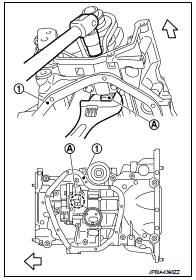
a. Push oil pump drive chain tensioner (1) in the direction show in the figure (A).
b. Insert a stopper pin (A) into the body hole (B).
c. Remove oil pump chain tensioner.
• When the holes on lever and tensioner body cannot be aligned, align these holes by slightly moving the oil pump chain tensioner slack guide.
![d. Hold the WAF part of oil pump shaft [WAF: 10 mm (0.39 in)] (A),](images/books/335/8/index.46.jpg)
d. Hold the WAF part of oil pump shaft [WAF: 10 mm (0.39 in)] (A), and then loosen the oil pump sprocket bolt and remove it.
1 : Oil pan (upper)
 : Engine front
CAUTION:
• Secure the oil pump shaft with the WAF part.
• Never loosen the oil pump sprocket bolt by tightening the oil pump drive chain.
e. Remove oil pump sprocket.
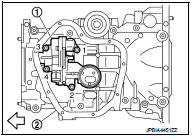
5. Remove oil pump.
• Loosen bolts in reverse order as shown in the figure.
1 : Oil pump
2 : Oil pan (upper)
: Engine front
INSTALLATION
Note the following, and install in the reverse order of removal.
Oil Pump
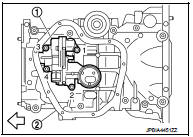
• Tighten bolts in numerical order as shown in the figure.
1 : Oil pump
2 : Oil pan (upper)
: Engine front
 Exploded View
1. O-ring
2. Oil pan (upper)
3. Oil level gauge guide
4. O-ring
5. Oil level gauge
6. Oil pump drive chain
7. Crankshaft sprocket
8. Oil pump sprocket
9. Oil pump chain tensioner
10. ...
 Inspection
INSPECTION AFTER INSTALLATION
1. Check the engine oil level. Refer to LU-8, "Inspection".
2. Start the engine, and check that there is no leakage of engine oil.
3. Stop the engine and wai ...
Other materials:
U0300 can communication data
Description
CAN (Controller Area Network) is a serial communication line for real-time
application. It is an on-vehicle multiplex
communication line with high data communication speed and excellent malfunction
detection ability.
Many electronic control units are equipped onto a vehicle, and ...
P159B G sensor
For M/T models : DTC Logic
DTC DETECTION LOGIC
DTC CONFIRMATION PROCEDURE
1.PRECONDITIONING
If DTC Confirmation Procedure has been previously conducted, always perform
the following procedure
before conducting the next test.
1. Turn ignition switch OFF and wait at least 10 seconds.
2. T ...
Headlamp washer relay
Component Inspection
1.CHECK HEADLAMP WASHER RELAY
1. Turn the ignition switch OFF.
2. Remove headlamp washer relay.
3. Apply battery voltage to headlamp washer relay between terminals 1 and 2.
4. Check continuity of headlamp washer relay.
Is the inspection result normal?
YES >> Headl ...
