
Nissan Leaf 2018-2025 (ZE1) Owner's Manual : Hazard warning flasher switch
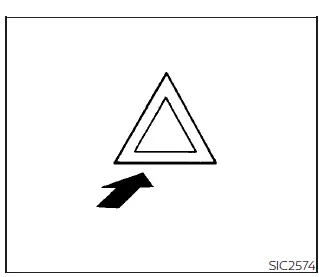
Activate the hazard warning flasher switch to alert other motorists when you are required to stop or park your Nissan Leaf under emergency conditions. Once engaged, all exterior turn signal lamps will flash simultaneously, providing high visibility to surrounding traffic.
WARNING
- If an emergency forces you to stop, always ensure you maneuver the Nissan Leaf completely off the traveled portion of the road to a safe area.
- Avoid using the hazard warning flashers while the vehicle is in motion on a highway. These lights should only be activated if unusual circumstances force you to drive at an extremely low speed that may pose a significant hazard to other drivers.
- Please note that the standard turn signal indicators are deactivated while the hazard warning flasher lights are in operation.
The hazard flasher system is designed to be operational regardless of the power switch position, allowing for emergency signaling even when the vehicle is powered down.
Note that some regional jurisdictions may prohibit the use of hazard warning flashers while the vehicle is actively driving on public roads.
Roadside assistance program
In the event of an unexpected roadside emergency, professional Roadside Assistance Service is available to support you. For comprehensive coverage details, eligibility, and contact instructions, please refer to your specific Warranty Information Booklet (for U.S. owners) or the Warranty & Roadside Assistance Information Booklet (for Canadian owners).
Emergency EV (Electric Vehicle) shut off
In the rare event that it becomes necessary to abruptly shut down the Nissan Leaf EV system while the vehicle is in motion, execute one of the following emergency procedures:
- Rapidly press the power switch three consecutive times within a window of 1.5 seconds, or
- Press and hold the power switch continuously for more than 2 seconds.

 Flat tire
...
Other materials:
Engine control system
Engine control system : Component Parts Location
ENGINE ROOM COMPARTMENT
1. Boost control actuator
2. Turbocharger boost control solenoid
valve
3. A/F sensor 1
4. Recirculation valve
5. EVAP canister purge volume control
solenoid valve
6. Inter cooler
7. Refrigerant pressure sensor
R ...
Front disc brake
Brake pad : Inspection and Adjustment
INSPECTION
Check brake pad wear thickness from an inspection hole on cylinder
body. Check using a scale if necessary.
Wear thickness : Refer to BR-71, "Front Disc Brake".
ADJUSTMENT
Burnish contact surfaces between disc rotor and brake pads acc ...
P0380 glow rela
DTC Logic
DTC DETECTION LOGIC
NOTE:
If DTC P0380 is displayed with DTC P0560 or P0657, first perform trouble
diagnosis for DTC P0560 or P0657.
Refer to EC-963, "DTC Logic" (DTC P0560) or EC-976, "DTC Logic" (DTC P0657).
Diagnosis Procedure
1.CHECK GLOW RELAY POWER SUP ...
