
Nissan Leaf 2018-2025 (ZE1) Owner's Manual : Chassis control
The chassis control module is a sophisticated electronic system integrated into the Nissan Leaf designed to enhance both vehicle stability and occupant comfort through the following primary functions:
- Intelligent Trace Control (I-TC)
- Active Ride Control (ARC)
Intelligent Trace Control (I-TC)
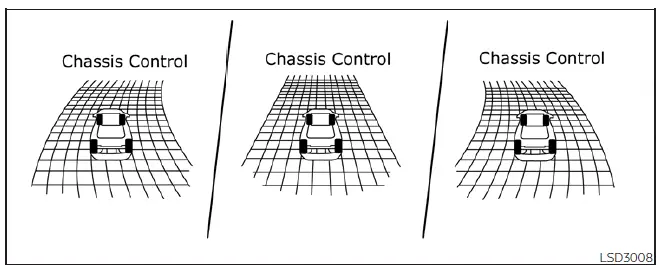
The Intelligent Trace Control system constantly analyzes driving dynamics by monitoring the driver's steering inputs alongside acceleration and braking patterns. By independently controlling the brake pressure at each individual wheel, the system helps the Nissan Leaf trace the desired path through corners more precisely and ensures a smoother, more composed vehicle response.
Drivers can conveniently enable or disable the I-TC feature by navigating to the "Settings" menu within the vehicle information display. Please note that if the Vehicle Dynamic Control (VDC) system is deactivated via the same settings menu, the I-TC function will automatically turn off as well.
When the I-TC is actively engaged, you can visualize its operation by selecting the "Chassis Control" mode in the vehicle information display, which will show real-time I-TC graphics as the system works.
Should the "Chassis Control System Error: See Owner's Manual" warning message appear on your information display, it may signal that the I-TC is not functioning as intended. We recommend having the system inspected at your earliest convenience by visiting a NISSAN certified LEAF dealer for professional service.
WARNING
The effectiveness of the I-TC can be limited by extreme driving conditions or road surfaces; therefore, always remain focused and drive with the appropriate level of caution.
While the I-TC is operating, it is normal to occasionally perceive a subtle pulsation in the brake pedal, hear faint mechanical noises, or sense a slight deceleration. These sensations are intentional and indicate that the system is working properly to manage vehicle path.
Even if you choose to turn off the I-TC feature, certain background functions—such as those designed to assist during emergency avoidance maneuvers—will remain active to ensure your safety.
Active Ride Control (ARC)
The Active Ride Control system monitors vehicle body motion by utilizing wheel speed information and modulating the traction motor torque accordingly. This process enhances ride comfort by proactively mitigating uncomfortable "pitching" or "bouncing" motions when the Nissan Leaf traverses undulating or uneven road surfaces. This feature automatically activates once the vehicle exceeds a speed of 25 mph (40 km/h).
Similar to the trace control, the ARC system is linked to the VDC; if the VDC system is turned off through the vehicle information display, the Active Ride Control is also disabled.
WARNING
The performance of the ARC may vary based on specific road conditions; always maintain attentive driving habits to account for changing terrain.
During the operation of the ARC, you may notice a slight noise or a feeling of minor deceleration. This is a standard characteristic of the system's torque management and confirms that the ARC is functioning correctly.
If the "Chassis Control System Error: See Owner's Manual" warning appears in your display, it could indicate an issue with the ARC system. Please have the vehicle checked promptly by a NISSAN certified LEAF dealer.
 Vehicle Dynamic Control (VDC) system
The Vehicle Dynamic Control (VDC) system in your Nissan Leaf serves as a comprehensive safety net, utilizing an array of sophisticated sensors to continuously monitor driver inputs, such as steering a ...
 Hill start assist system
WARNING
Never rely exclusively on the hill start assist system to prevent the vehicle from rolling backward on an incline. Always maintain a high level of vigilance.
When s ...
Other materials:
LED Daytime Running Lights (DRL) system (Type A)
The LED Daytime Running Lights (DRL) on your Nissan Leaf are designed for enhanced visibility, automatically illuminating at 100% intensity whenever the power switch is in the READY to drive position, provided the parking brake has been fully released.
The LED DRL system remains activ ...
B210C starter control relay
DTC Logic
DTC DETECTION LOGIC
NOTE:
• If DTC B210C is displayed with DTC U1000, first perform the trouble diagnosis
for DTC U1000. Refer to
PCS-30, "DTC Logic".
• When IPDM E/R power supply voltage is low (Approx. 7 - 8 V for about 1
second), the DTC B210C may be
detected.
...
P0112, P0113 IAT sensor
DTC Logic
DTC DETECTION LOGIC
DTC CONFIRMATION PROCEDURE
1.PRECONDITIONING
If DTC Confirmation Procedure has been previously conducted, always perform
the following procedure
before conducting the next test.
1. Turn ignition switch OFF and wait at least 10 seconds.
2. Turn ignition swit ...
